
A post format is a piece of meta information that can be used by a theme to customize its presentation of a post. The post formats feature provides a standardized list of formats that are available to all themes that support the feature. Themes are not required to support every format on the list. New formats cannot be introduced by themes or even plugins. The standardization of this list provides both compatibility between themes and an avenue for external blogging tools to access this feature in a consistent fashion.
In short, with a theme that supports post formats, a blogger can change how each post looks by choosing a post format from a radio-button list.
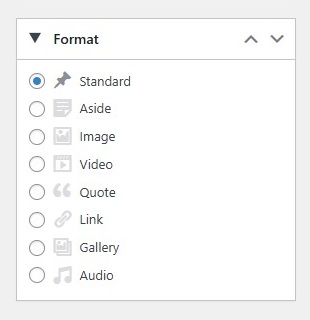
How things are actually displayed is entirely up to the theme. There are also themes that support this feature, without providing different styling for posts that belong to the various post formats.
Supported FormatsLink to this section
The following post formats are available for users to choose from, if the theme enables support for them.
- Standard – The default post format
- Aside – A note like post, usually styled without title
- Gallery – A gallery of images
- Link – A link to another site
- Image – An image or photograph
- Quote – A quotation
- Status – Twitter like short status update
- Video – A post containing video
- Audio – An audio file
- Chat – A chat transcript
Below we go into detail on each of the post formats.
Standard
Standard is the default post format in ClassicPress. It can be an article, a blog post, or anything the user want it to be. A standard post can also be any of the other post formats as well. For example, a standard post can have a gallery or a video. The user can decide whether they want to use their theme’s built in support for the formatting and display of a particular post format or they would rather use the standard post format.
Aside
Aside is an extra bit of information that a blogger may want to provide to their readers without writing a standard post about it. It could be an external link, reference to a discussion carried out elsewhere on the web, or an interesting piece of information that does not fit in the regular scope of the blog’s posts.
Gallery
Gallery feature allows you to add multiple images in a post or page. Theme developers can add support for it and define the gallery presentation in their theme. An image gallery can be inserted using the “Add Media” button and then clicking on “Create Gallery” tab. A gallery is inserted in the post using a shortcode. The ids are the ids of images in the media library, allowing users to easily include images to the gallery.
Link
A link post format contains a link to a web location. Ideally it is used when a user just want to share a link instead of writing a post. They can just add a title of the link and the URL or optionally add their own commentary for the link.
Image
An image post format in is used to display a single image.
Quote
Quote is used for quotations, specially when a user wants to just share a quote which is not within a standard post or article. A user may decide to add or to wrap a quote around the “blockquote” HTML tag.
Status
Status is usually a short, twitter-like, status update. However, it is not necessary for an status to be short or twitter-like. A user may choose to write longer status updates.
Video
A post in video post format usually contains a video either embedded from a third party video hosting service like YouTube or uploaded to your media library and played directly from your site.
Audio
A post with the audio post type usually contains an audio file embeded from a third party hosting service or from your media library.
Chat
Chat is used to display a chat transcript.
Adding Theme SupportLink to this section
Themes need to use add_theme_support() in the functions.php file to tell ClassicPress which post formats to support by passing an array of formats like so:
add_theme_support( 'post-formats', array( 'aside', 'gallery' ) );
Note that you must call this before the init hook gets called. A good hook to use is the after_setup_theme hook.
Adding Post Type SupportLink to this section
(Custom) Post Types need to use the additional add_post_type_support() in the functions.php file to tell ClassicPress to support post formats:
// add post-formats to post type 'page'
add_post_type_support( 'page', 'post-formats' );
Using Post FormatsLink to this section
In the theme, use get_post_format() to check the format for a post, and change its presentation accordingly. Note that posts with the default format will return a value of false.
Alternatively, use the has_post_format() conditional tag:
if ( has_post_format( 'video' ) ) {
	echo 'This is the video format.';
}
Suggested StylingLink to this section
As mentioned in previous section, with the help of get_post_format() and has_post_format() theme developers can modify the appearance of posts from a specific post format. Besides this one can target posts that belong to a certain post format with specific CSS-classes, like format-standard or format-audio for posts in a blog and single-format-standard or single-format-audio for single post pages. Site owners can use these CSS-classes to make their own changes via the the Additional CSS page in the Customizer.
Each of the formats lend themselves to a certain type of appearance. It is well to keep in mind the intended usage for each format when applying styles.
For example, the aside, link, and status formats are simple, short, and minor. These will typically be displayed without title or author information. The aside could contain perhaps a paragraph or two, while the link would be only a sentence with a link to a URL in it. Both the link and aside might have a link to the single post page, using the_permalink(), and would thus allow comments, but the status format very likely would not have such a link.
An image post, on the other hand, would typically just contain a single image, with or without a caption/text to go along with it. An audio/video post would be the same but with audio/video added in. Any of these three could use either plugins or standard embeds to display their content. Titles and authorship might not be displayed for them either, as the content could be self-explanatory.
The quote format is especially well suited to posting a simple quote from a person with no extra information. If you were to put the quote into the post content alone, and put the quoted person’s name into the title of the post, then you could style the post so as to display the_content() by itself but restyled into a blockquote format, and use the_title() to display the quoted person’s name as the byline.
A chat in particular will probably tend towards a monospaced type display, in many cases. With some styling you can make it display the content of the post using a monospaced font, perhaps inside a gray background div or similar, thus distinguishing it visually as a chat session.
Post Formats in a Child ThemeLink to this section
Child Themes inherit the post formats defined by the parent theme. Calling add_theme_support() for post formats in a child theme must be done at a later priority than that of the parent theme and will override the existing list, not add to it.
add_action( 'after_setup_theme', 'childtheme_formats', 11 );
function childtheme_formats() {
	add_theme_support( 'post-formats', array( 'aside', 'gallery', 'link' ) );
}
Calling this will remove it all together:
remove_theme_support( 'post-formats' )