
The Add New User screen allows you to add new users who can login to your site.
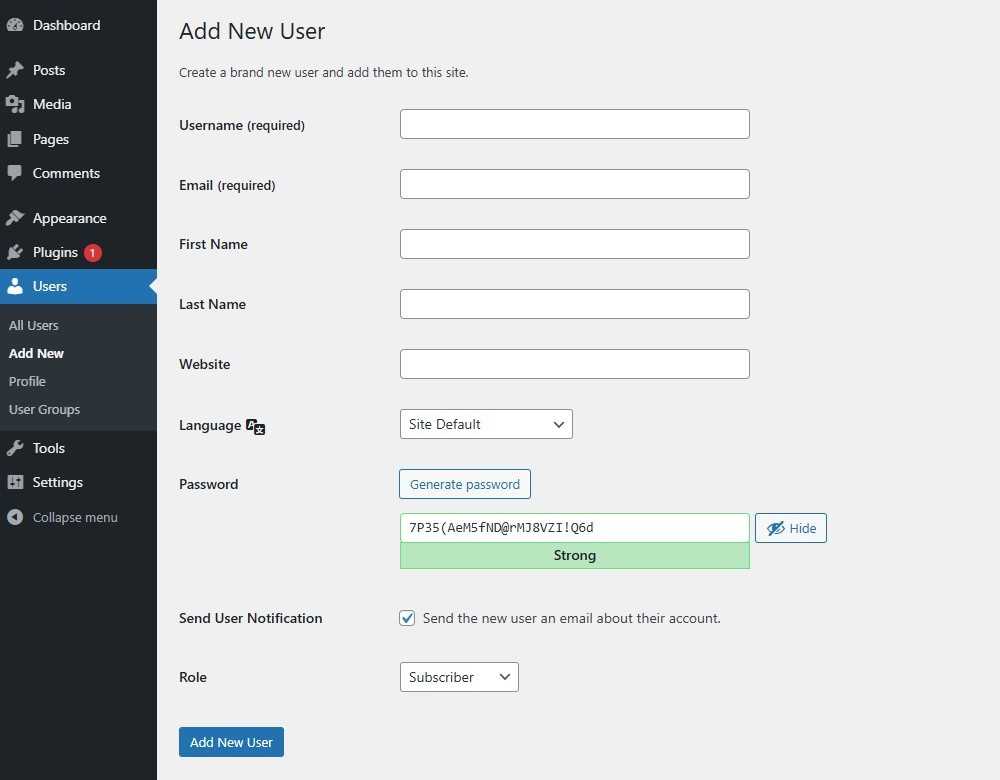
Add New UserLink to this section
In this screen, you may add new users to your site. If the “Anyone can register” option is set in the Membership section of the Settings > General screen, users can register themselves at https://www.example.com/wp-register.php, or via custom registration forms when using a membership plugin. Regardless of that setting, you can manually create new users here.
- Username (required) – Enter the username of the new user. This will also be used as the login name of this user.
- Email (required) – Enter a valid email address of the new user. The email address must be unique for each user. If a published post or page is authored by this user, then when approved comments are made to that post or page, a notification email is sent to this email address.
- First Name – Enter the first name of the new user.
- Last Name – Enter the last name of the new user (the display name defaults to first and last name).
- Website – You may enter the new user’s site URL.
- Language – You can select the administration language for this user.
- Password – Enter a password for the new user, or generate one via the “Generate password” button.
The Strength Indicator indicates if the password you entered is Very Weak, Weak, Medium, or Strong (displayed in green). The stronger the password the more secure the login. Hint: The password should be at least seven characters long. To make it stronger, use upper and lower case letters, numbers and symbols like !”?$%^&). - Send User Notification – Check the box to send this password to the new user by email.
- Role – Select the desired role for this user from the select box. By default this is the role set on the Settings > General screen (New User Default Role). By default these user roles are available:
- Super Admin (multisite only) – somebody with access to the site network administration features and all other features.
- Administrator – somebody who has access to all the administration features within a single site.
- Editor – somebody who can publish and manage posts including the posts of other users.
- Author – somebody who can publish and manage their own posts.
- Contributor – somebody who can write and manage their own posts but cannot publish them.
- Subscriber – somebody who can only manage their profile. This user role is useful if you have a membership site, eCommerce store, or another site where users can register and log in.
Click the Add New User button to save the new user’s information into ClassicPress’ database. A notification message at the top of the screen will advise you that the new user has been added.
Edit UserLink to this section
For editing existing users navigate to the Users Profile Screen.