
On the Settings Reading Screen you can decide if you want your latest posts or a “static” page displayed as your site’s home (front) page. You can also adjust how many posts are displayed on that home page. In addition, there are settings for feeds, you could ask search engines not to index your site, and you could enable Object caching.
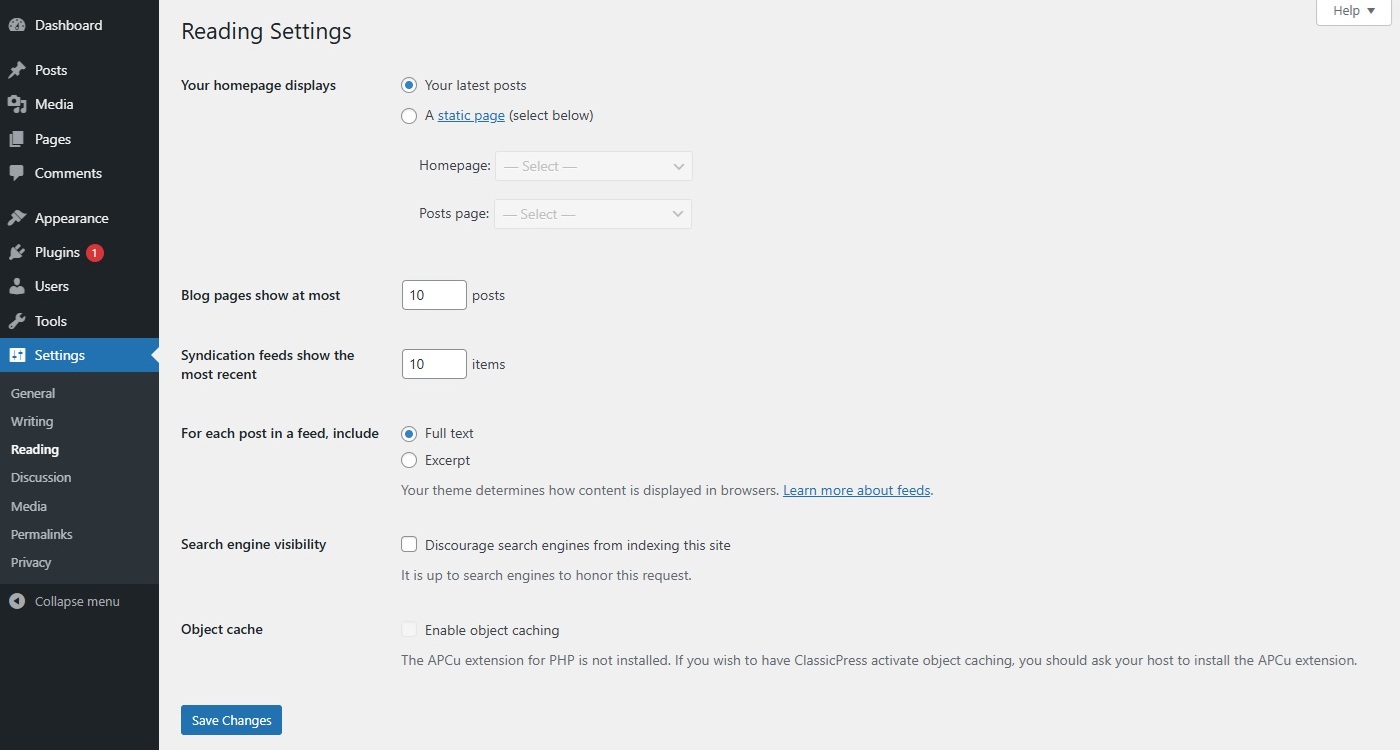
Reading SettingsLink to this section
Your homepage displaysLink to this section
Your site’s home page uses these settings to determine if your posts or a “static” page is displayed as your site’s home page. These settings work only if you have one or more pages defined. Note that some themes or plugins have “posts display” control/restriction, that may affect how this feature works.
Blog pages showLink to this section
Enter the number of posts to be displayed, per page, on your site.
Syndication feeds showLink to this section
Enter the number of posts people will see when they download one of your site’s feeds.
A feed is an automated, computer-readable XML file that shares your site’s newest posts. Readers can use feed reader plugins or apps to follow your site and get updates whenever you publish a new post. You can access your feed directly by adding /feed behind your site domain (e.g. https://www.example.com/feed). For detailed information about feeds, see the ClassicPress Feeds article.
For each post in a feed, includeLink to this section
Determines whether or not the feed will include the full post or just an excerpt.
- Full text – Click this radio button to include the full content of each post.
- Excerpt – Click this radio button to include an excerpt of the post. This could save bandwidth.
Search engine visibilityLink to this section
Check this box to ask search engines not to index this site. A robots meta tag (noindex, nofollow) is added to the head section of your site. It’s up to search engines to honor this request.
Object cacheLink to this section
Note: This requires the APCu extension for PHP to be installed on your server. If this extension is not available, you cannot activate this feature. You should then ask your host to install the APCu extension.
The Site Health tool recommends that you use an object cache to reduce the load on your site’s database and potentially speed up the responsiveness of your site. If you have not already installed an object cache and would like ClassicPress to do so for you, click the box next to “Object cache” and click the Save Changes button at the bottom of the screen.
Note that an object cache is different from page caching. You may have them both running on your site; ClassicPress’s object cache will not conflict with page caching plugins.
Unlike page caching, object caching will work even when a user is logged in. This makes it particularly useful for membership sites and intranets.