
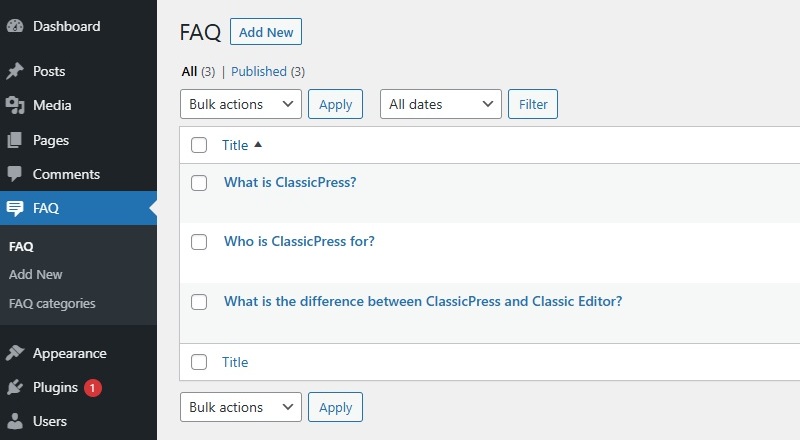
Let’s say you want to display a section with FAQ posts at your site. But you don’t want to use the default posts or pages for that. Fortunately the ClassicPress core Post API allows you to register a Custom Post Type specifically for your FAQ posts. This user guide gives you the basics about Custom Posts Types and provides a working example for an easy and fast kickstart of your development work.
What is a Post Type?Link to this section
ClassicPress houses lots of different types of content and they are divided into something called Post Types. By default ClassicPress comes with a few different post types which are all stored in the database under the posts table.
Default Post TypesLink to this section
The default post types that are always included within a ClassicPress installation are:
- Posts – A post in ClassicPress is a post type that is typical for, and most used by blogs. Posts are normally displayed in a reversed time-based order (newest post first). They are also used for creating RSS feeds.
- Pages – A page is similar to posts however they have some very important differences. Pages aren’t displayed in a reversed time-based order. They can also be placed into a hierarchical order where a page can be the parent or child of another page creating a page structure. Traditionally, pages also do not make use of categories and tags like posts do.
- Attachments – Attachments are another post type that is special as these hold information about any media that is uploaded to your ClassicPress site.
- Revisions – Revisions are a particularly special post type as they are used to create a history of other post types in case you make a mistake and want to rollback to a previous version.
- Navigation Menus – Menus in ClassicPress are lists of links that can be used to navigate your site. This allows you to create custom lists of links to various locations on your site.
- Custom CSS – Custom CSS is a theme specific post type used to store CSS saved from The Customizers Additional CSS screen. Each theme can have its own custom CSS post but only the active themes “custom_css” post is actually used.
- Changesets – Changesets are similar to revisions but specifically for the Customizer.
Custom Post TypesLink to this section
Whilst there are already lots of standard post types within ClassicPress, you may want to extend the amount of post types you have if you want to break things down into smaller categories. For example, if you want to display a section with FAQ posts at your site, it would be better to create a custom post type for them. This can be done using the register_post_type function.
Custom Post Type TaxonomyLink to this section
A taxonomy within ClassicPress is a way of grouping posts together. By default, a post will have two taxonomy types called Categories and Tags. The individual Categories and Tags are called “terms”.
If you want to use categories to group your FAQs, you should use the register_taxonomy function to create a taxonomy just for the FAQ post type.
Template FilesLink to this section
By default ClassicPress makes use of the index.php, single.php and archive.php files in a theme to display posts of any type. However, if you’ve registered a custom post type, you may want to display this information in a different way. You can do this by using post type specific custom templates within your (child) theme.
If you create a post type called FAQ like in the example above, you can create a template file called single-faq.php which will show the individual FAQ posts that you publish. And a template file called archive-faq.php which will show all the FAQ posts that you’ve published in a custom post type archive page (e.g. https://www.example.com/faq).
Post Type QueriesLink to this section
If you want to get a list of your custom posts called FAQs, you can create a new WP_Query instance and fetch them all. This is handy if you want to create a custom loop somewhere on your site and show them in a different way to other posts. As this user guide only covers the basics, we will not deep into this further.
Working ExampleLink to this section
After reading all above you may want to know how to create your own custom post type.
So let’s create the already mentioned FAQ post type together!
Please note that this user guide only covers the basics, so only information for this specific example is given.
Register FAQ Post TypeLink to this section
First step is to register your custom post type called FAQ.
You could add the following code to file functions of your child theme, or include the code in your plugin.
We do not recommend adding this to an existing theme, as you will loose your work when theme is updated by its author.
function cp_custom_post_type() {
	$cp_args = array(
		'label' => __( 'FAQ', 'your-text-domain' ),
		'menu_icon' => 'dashicons-testimonial',
		'public' => true,
		'has_archive' => true,
		'can_export' => true,
		'show_in_nav_menus' => false,
 		'supports'=> array( 'title', 'thumbnail', 'comments', 'excerpt', 'editor' )
	);
	register_post_type( 'faq', $cp_args);
}
add_action( 'init', 'cp_custom_post_type' );
While registering the FAQ post type we’ve included the following parameters to customize it to our needs:
- label – The display name for this post type.
Use alabelsarray if you want more custom labels (such as “Add new FAQ” instead of “Add new”).
Iflabelnorlabelsis set, the default post labels are inherited. - menu_icon – The icon used in the administration menu, in this case the “testimonial” Dashicon.
See the WordPress Dashicons article for all available icons. - public – Whether or not the post type is (also) available for use at the public facing site.
- has_archive – Whether or not there should be post type archives. Or the archive page slug to use (e.g.
has_archive => 'faqs'). - can_export – Whether or not this post type can be exported.
- show_in_nav_menus – Whether or not the post type is available for selection in navigation menus.
- supports – Core feature(s) the post type supports.
Register FAQ TaxonomyLink to this section
To register your (optional) FAQ post type taxonomy you could use the following code. This makes it possible to group your FAQs with categories.
function cp_taxonomy() {
	$cp_cat_args = array(
		'label' => __( 'FAQ categories', 'your-text-domain' ),
		'hierarchical' => true,
		'show_in_nav_menus' => false,
	);
	register_taxonomy( 'faq_cat', 'faq', $cp_cat_args );
}
add_action( 'init', 'cp_taxonomy' );
While registering the taxonomy we’ve included the following parameters to customize it to our needs:
- label – The display name for this taxonomy.
Use alabelsarray if you want more custom labels (e.g. “Add new FAQ category” instead of “Add new category”).
Iflabelnorlabelsis set, the default post category labels are inherited. - hierarchical – Whether or not the taxonomy can have sub categories.
- show_in_nav_menus – Whether or not the taxonomy is available for selection in navigation menus.
Display your FAQsLink to this section
As mentioned earlier, there are 2 ways of displaying your posts at the public facing site.
- With a Template File
- With a Post Type Query
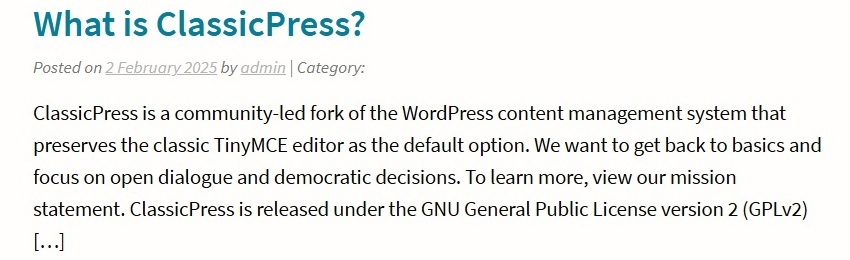
The appearance of the FAQ posts varies by theme. In general they look similar to default posts.
Customize Appearance
If you want to customize the styling (CSS) of the custom post type pages, you could target post and page elements with a prefix.
- Use
.single-xxxto target individual post elements. - Use
.post-type-archive-xxxto target archive page elements. - Use
.tax-xxxto target elements of FAQ category pages.
For your FAQ post type these would be .single-faq, .post-type-archive-faq and .tax-faq_cat.
Example:
.single-faq .post-title,
.post-type-archive-faq .post-title a,
.tax-faq_cat .post-title a {
	color: #cc0000;
}
Include any custom styling (CSS) in your child theme, plugin, or use the Additional CSS screen in the Customizer.
The ClassicPress Theme
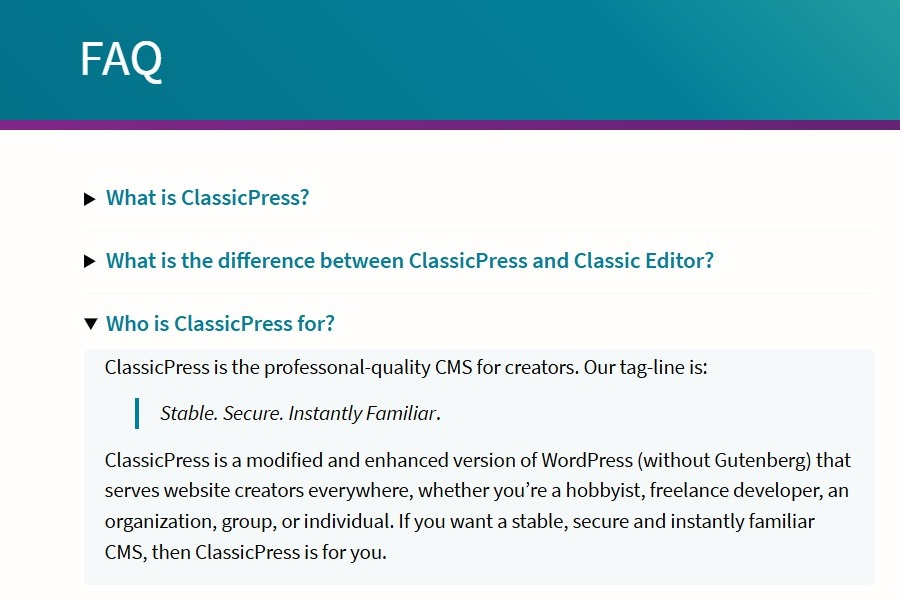
Note that our default The ClassicPress Theme comes with a ready-made template for Frequently Asked Questions. To make use of this, register the post type as faq and specify a slug for its archive page with the has_archive parameter (e.g. has_archive => 'faqs'). The theme will then display your FAQs using accessible disclosure widgets. This (archive) page will use the custom post type name as page title (e.g. FAQ). Just remember to create a custom link to the FAQs page in your menu (e.g. https://www.example.com/faqs).
If you want to customize the styling (CSS) of this page, you could target elements with prefix .post-type-archive-faq.
Permalinks
In case your newly added FAQ pages won’t display properly (e.g. 404 nothing found), you may have to flush the permalinks. You can do this via the Settings > Permalinks screen. Just click the Save Changes button to resave the permalink settings and see whether or not this solves the problem.