
Customizing the Time and Date FormatLink to this section
Certain ClassicPress tag functions are used to display or return date and time information; the_date() and the_time() are examples of this.
By default, these functions will display or return date and time in format as it is set in the Settings > General screen. This is the place where customizing format for date and time will take effect throughout the whole ClassicPress installation.
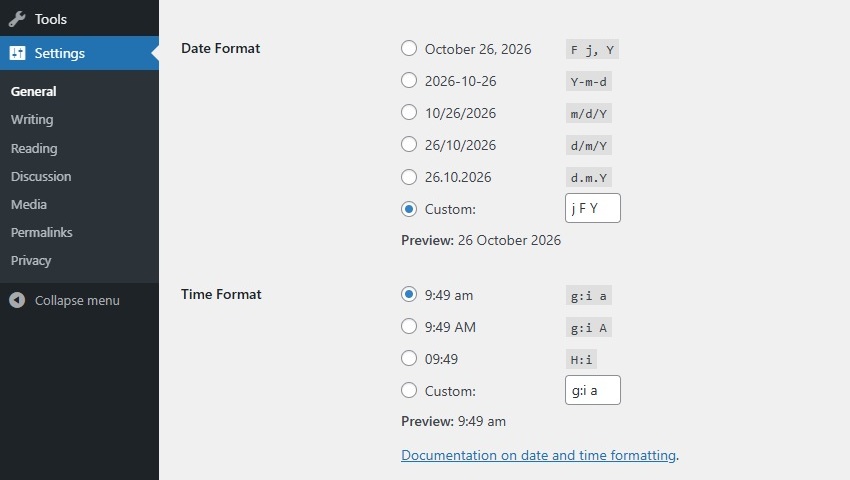
Notice the string of characters next to each date and time formatting in screenshot. This string is called a format string. Each letter represents a specific part of date or time.
For example, the format string:
l, F j, Y
creates a date that look like this (note that commas are read literally):
Monday, October 26, 2026
Here is what each format character in the string above represents:
- l = Full name for day of the week (lowercase L).
- F = Full name for the month.
- j = The day of the month.
- Y = The year in 4 digits. (lowercase y gives the year’s last 2 digits)
Format characters are standardized and globally used in PHP programming language. As ClassicPress is written in PHP you can use the table of date and time format characters directly from the PHP site.
Here is a table of some of the more useful items found there:
Day of Month
- d | Numeric, with leading zeros | 01–31
- j | Numeric, without leading zeros | 1–31
- S | The English suffix for the day of the month | st, nd, th (1st, 2nd, 15th)
Weekday
- l | Full name | Sunday – Saturday (lowercase L)
- D | Three letter name | Mon – Sun
Month
- m | Numeric, with leading zeros | 01–12
- n | Numeric, without leading zeros | 1–12
- F | Textual full | January – December
- M | Textual three letters | Jan – Dec
Year
- Y | Numeric, 4 digits | E.g. 1999, 2026
- y | Numeric, 2 digits | E.g. 99, 26
Time
- a | Lowercase | am, pm
- A | Uppercase | AM, PM
- g | Hour, 12-hour, without leading zeros | 1–12
- h | Hour, 12-hour, with leading zeros | 01–12
- G | Hour, 24-hour, without leading zeros | 0-23
- H | Hour, 24-hour, with leading zeros | 00-23
- i | Minutes, with leading zeros | 00-59
- s | Seconds, with leading zeros | 00-59
- T | Timezone abbreviation | E.g. EST, MDT
Full Date/Time
- c | ISO 8601 | 2026-10-26T10:54:51+01:00
- r | RFC 2822 | Mon, 26 Oct 2026 10:54:51 +0200
- U | Unix timestamp (seconds since Unix Epoch) | 1793012091
Format String ExamplesLink to this section
Here are some examples of date format with the result output.
F j, Y g:i a – October 26, 2026 12:50 am
F j, Y – October 26, 2026
F, Y – October, 2026
g:i a – 12:50 am
g:i:s a – 12:50:48 am
l, F j, Y – Monday, October 26, 2026
l, F jS, Y – Monday, October 26th, 2026
M j, Y @ G:i – Oct 26, 2026 @ 0:50
Y/m/d \a\t g:i A – 2026/10/26 at 12:50 AM
Y/m/d \a\t g:ia – 2026/10/26 at 12:50am
Y/m/d g:i:s A – 2026/10/26 12:50:48 AM
Y/m/d – 2026/10/26
Using Date and Time related FunctionsLink to this section
Functions for date and time accept a format string as parameter in order to override default date and time formatting in theme or plugin files. Just the same as in General Settings, this format string consists of characters where each character represents a specific part of Date or Time.
ClassicPress provides various date and time related functions you can choose from. Although some of them seem to output the same, e.g. the_date() and the_time(), there are subtle differences between them. So check the Code Reference and choose wisely, depending on the use case. Below an example of using one of the date and time related functions.
Display your current post date:
Posted on <?php the_date( 'j F Y' ); ?>.
This will render on the public facing site as following:
Posted on 26 oktober 2026.
As you can see the month is localized (translated), because the function uses the Site Language from the Settings > General screen. To enable translation for the label as well, you should localize it.
LocalizationLink to this section
Localization describes the process of translating a software and adapting its strings to a specific location.
You could wrap the translateble text in __() or _e() which gets or displays the translation of the text. If no translation is available, it will display the original.
To make the label from above translatable:
<?php printf( __( 'Posted on %s.', 'your-text-domain' ), get_the_date( 'j F Y' ) ); ?>
If the string is translated, this may render on the public facing site as following:
Geplaatst op 26 oktober 2026.
To support localization for date and time, its best to use the wp_date() function. Besides a localized date display, you can modify the output by using an optional timestamp and timezone.
wp_date( $format, $timestamp, $timezone );
You can wrap your predefined format in __() or _e() in order to allow translators to adjust the date and time to the proper local format.
To display a localized label and publishing date of the current post:
<?php printf( __( 'Posted on %s.', 'your-text-domain' ), wp_date( __( 'j F Y', 'your-text-domain' ), get_post_timestamp() ) ); ?>
If the string is translated (without changing the predefined format), this may render on the public facing site as following:
Geplaatst op 26 oktober 2026.